返回> 网站首页
SQLiteStudio数据库插件开发
 yoours2026-06-26 16:52:49
简介一边听听音乐,一边写写文章。
一、介绍
自定义使用sqlite,比如上一篇所说增加数据库文件读写异或操作。那么原有sqlite数据库工具就无法打开进行操作了,需要自行编写数据库查看工具。
这里使用开源 SQLiteStudio 数据库工具,编写自定义的sqlite数据库驱动插件实现针对自定义sqlite数据库的操作。
二、下载开源代码
SQLiteStudio:https://github.com/pawelsalawa/letos
Sqlite:https://www3.sqlite.org/2026/sqlite-amalgamation-3530200.zip
三、编译SQLiteStudio
以3.4版本letos-3.4为例:
使用Qt5 打开 letos-3.4\SQLiteStudio3\SQLiteStudio3.pro 文件,配置MinGW_64_bit编译,如果提示找不到sqlite库,则编译sqlite静态库。
四、编译sqlite静态库
sqlite3.pro 工程内容:
QT -= guiTEMPLATE = lib
CONFIG += staticlib
CONFIG += c++17
DEFINES += SQLITE_ENABLE_COLUMN_METADATA
SOURCES += \
sqlite3.c
HEADERS += \
sqlite3.h \
sqlite3ext.h
!isEmpty(target.path): INSTALLS += target
五、编写数据库驱动插件 - 工程结构
驱动插件的编写可参考 letos-3.4\Plugins 目录下的:DbSqliteCipher 和 DbSqliteWx,编写自己的 DbMySqlite 驱动库,如下:
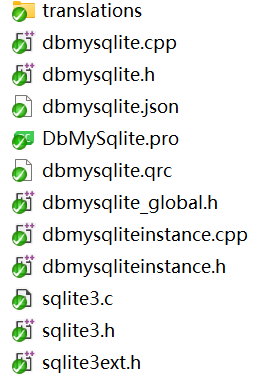
其中 sqlite3.c、sqlite3.h、sqlite3ext.h 为开源的sqlite数据库。
六、编写数据库驱动插件 - DbMySqliteInstance文件
DbMySqliteInstance::DbMySqliteInstance(const QString& name, const QString& path, const QHash<QString, QVariant>& connOptions) :
AbstractDb3<MySqlite>(name, path, connOptions)
{
}
AbstractDb3<MySqlite>(name, path, connOptions)
{
}
Db* DbMySqliteInstance::clone() const
{
return new DbMySqliteInstance(name, path, connOptions);
}
QString DbMySqliteInstance::getTypeClassName() const
{
return "DbMySqliteInstance";
}
void DbMySqliteInstance::initAfterOpen()
{
// 从打开窗口获取密码
QString key = connOptions[DbMySqlite::PASSWORD_OPT].toString();
if (!key.isEmpty())
{
QByteArray byteArray = QByteArray::fromHex(key.toLatin1());
// 这里是获取到的密码字符串,根据需要进行转换。
// 这里配置你的加密算法
}
AbstractDb3<MySqlite>::initAfterOpen();
}
}
AbstractDb3<MySqlite>::initAfterOpen();
}
QString DbMySqliteInstance::getAttachSql(Db *otherDb, const QString &generatedAttachName)
{
return QString("ATTACH '%1' AS %2;").arg(otherDb->getPath(), generatedAttachName);
}
七、编写数据库驱动插件 - DbMySqlite文件
DbMySqlite::DbMySqlite()
{
}
{
}
QString DbMySqlite::getLabel() const
{
return "MySQLite";
}
bool DbMySqlite::checkIfDbServedByPlugin(Db* db) const
{
return (db && dynamic_cast<DbMySqliteInstance*>(db));
}
// 这里配置表示需要密码文本框
QList<DbPluginOption> DbMySqlite::getOptionsList() const
{
QList<DbPluginOption> opts;
DbPluginOption optPass;
optPass.type = DbPluginOption::PASSWORD;
optPass.key = PASSWORD_OPT;
optPass.label = tr("Password (key)");
optPass.toolTip = tr("Leave empty to create or connect to decrypted database.");
optPass.placeholderText = tr("Encryption password");
opts << optPass;
return opts;
}
Db *DbMySqlite::newInstance(const QString &name, const QString &path, const QHash<QString, QVariant> &options)
{
return new DbMySqliteInstance(name, path, options);
}
八、完成
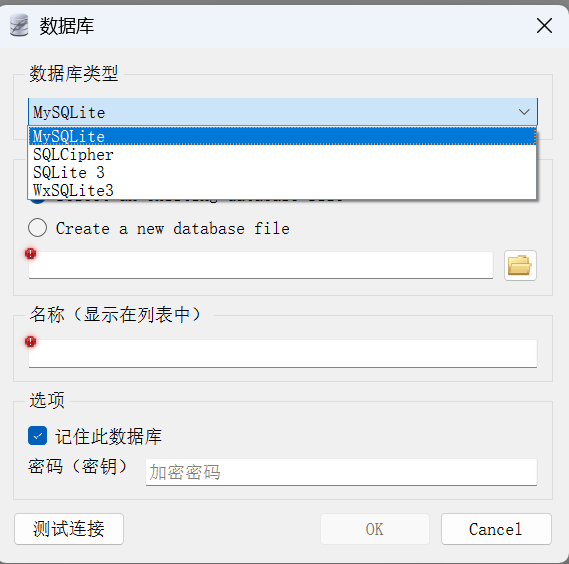
1. 如图显示,新增了自定义的MySQLite数据库驱动,且显示密码输入框。
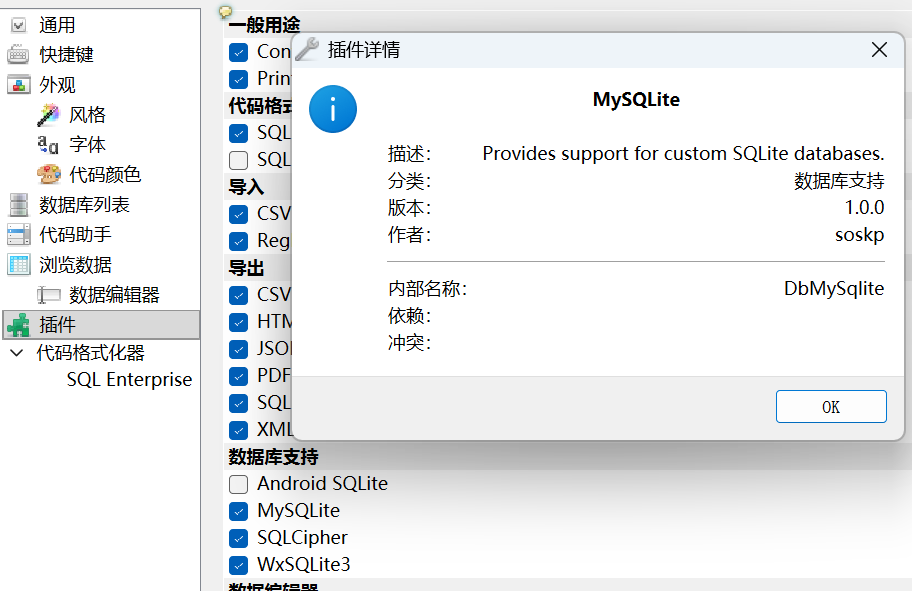
2. 查看插件可见插件在数据库支持栏增加了一项,且新增的数据库信息如下:
文章评论
2537人参与,0条评论